VerdictAI

Buying guide · 2026

Best USB-C Hubs & Docking Stations

USB-C hubs and docking stations span everything from $20 travel dongles to $400 Thunderbolt 5 powerhouses, and the right pick depends heavily on how many displays you need, how much pass-through wattage your laptop demands, and whether your machine speaks Thunderbolt at all. The picks below synthesize what expert reviewers at Macworld, TechRadar, Tech Advisor and How-To Geek, alongside verified-purchase customers at Best Buy and long-running threads on r/UsbCHardware, have written about the current field. Where reviewers disagree — particularly on Mac compatibility quirks and DisplayLink trade-offs — we flag the disagreement rather than smooth it over.

Sources behind this synthesis

26 reviewers read. Weighted by trust.

We don’t review products. We read what other reviewers wrote, score each source for trustworthiness, and synthesize the consensus.

How sources are scored →

Trust mix

No flagged sources

Trusted2trustedMixed18mixed

Trusted contributors

Best Buy customersr/buildapc
Show all 18 other sources →
YouTube · 1 Thunderbolt 5 ...r/UsbCHardwarer/laptopsr/pcmasterracer/macr/macbookairTechRadarr/Thunderboltr/setupsr/macbookpror/iPadPror/macbookr/SteamDeckr/SamsungDexYouTube · 7 in 1 HubYouTube · 1 Hub ReviewYouTube · Port USB Adapter for Laptops, 4K ...YouTube · 1 Hub? Plugable vs Anker Review

By source type

Expert
1
Retailer
1
Community
18
Video
6

At a glance

Our top pick

#1 of 5
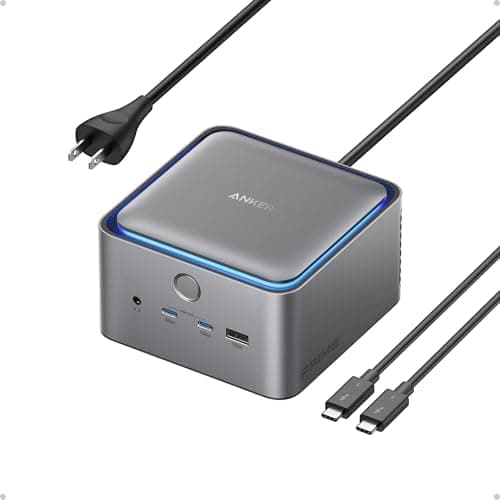
Top pick · #1Anker Prime TB5 Docking Station, 14-in-1 Thunderbolt 5 Dock with 120Gbps Max Transfer, Thunderbolt Dock with…
Best Thunderbolt 4 / USB4 dock

Anker Prime TB5 Docking Station, 14-in-1 Thunderbolt 5 Dock with 120Gbps Max Transfer, Thunderbolt Dock with…

★★★★★4.2(362)86Great

Across the reviewers we read, the Anker Prime TB5 is positioned as the forward-looking pick for anyone with a Thunderbolt 5 or Thunderbolt 4 laptop who wants headroom for years to come. YouTube reviewers covering the launch highlighted the 120Gbps max transfer, 140W laptop charging, and support for dual displays up to 8K, with r/Thunderbolt commenters specifically calling out that the 140W output keeps high-end laptops at 100% even during sustained exports where an older 85W dock would slowly drain.

The rest of the rankings

#2–5

Frequently asked

5 questions
Do I need a Thunderbolt dock or will a regular USB-C hub work?
If your laptop has Thunderbolt 4 or Thunderbolt 5 ports and you need dual high-refresh 4K displays, fast external SSD speeds, or daisy-chained peripherals, reviewers consistently recommend a true Thunderbolt dock. For single-display setups, occasional travel, and basic peripheral expansion, a standard USB-C hub at a fraction of the price is enough — Wirecutter and How-To Geek both note most users overspend on Thunderbolt features they never use.
Why can't my MacBook Air run two external monitors from a normal hub?
Apple's M1, M2, and base M3 chips officially support only one external display over USB-C. To drive two or more external monitors on those Macs, reviewers at Macworld and threads on r/mac repeatedly point to docks with DisplayLink built in (such as the Anker Prime DL7400), which uses a software driver to bypass the hardware limit. MacBook Pro models with M-series Pro/Max chips don't have this restriction.
How much pass-through wattage do I actually need?
A 13-inch MacBook Air or similar ultrabook typically charges fine at 60–70W. A 14-inch MacBook Pro wants 96W, and 16-inch MacBook Pros plus high-end Windows workstations expect 140W. Reddit threads on r/Thunderbolt repeatedly warn that under-powered docks cause slow battery drain during heavy workloads, so reviewers recommend matching or exceeding the laptop's bundled charger wattage.
Are cheap USB-C hubs safe to use with a MacBook?
Reviewers on r/UsbCHardware regularly caution that ultra-cheap no-name hubs have been linked to overheating and, in rare reports, damaged ports. Sticking with established brands (Anker, Belkin, Sabrent, Acer-branded, Lenovo) and avoiding hubs with no documented PD spec is the consensus advice. Verified-purchase reviews at Best Buy and long-tenured Amazon listings with tens of thousands of reviews are reasonable proxies for real-world reliability.
Will a Thunderbolt 5 dock work with my Thunderbolt 4 laptop?
Yes — TB5 docks are backward compatible with TB4 and TB3, though you'll be capped at the older standard's bandwidth. Reviewers note this is a reasonable future-proofing buy if you expect to upgrade your laptop in the next couple of years, but otherwise a TB4 dock is meaningfully cheaper for identical real-world performance today.