

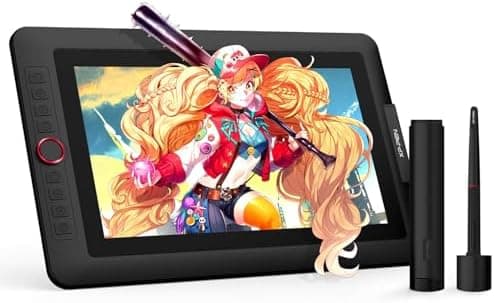
XPPen Drawing Tablet with Screen Full-Laminated Graphics Drawing Monitor Artist13.3 Pro Graphics Tablet with Adjustable Stand and…
XP-Pen
Best for
Best XPPen Artist
Amazon rating
Amazon aggregate, one input among many in the Verdict Score
Current price
$209.99
Updated May 18, 2026 · 1 min read
Sources behind this verdict
10 reviewers weighted by source trust
The consensus
What reviewers found
Synthesized across the trust-weighted source mix below.
Across the reviewers we read, the XPPen Artist 13.3 Pro is the long-running budget display tablet pick that keeps showing up in r/ArtistLounge and r/XPpen recommendations. Owners on r/ArtistLounge specifically praise the pen calibration and pressure sensitivity, and r/XPpen commenters call out the screen quality as surprisingly good for the price, with one user noting movies look better on the XPPen than on their regular monitor. The Red Dial interface and eight customizable shortcut keys are repeatedly cited as a meaningful productivity advantage at this price.
What reviewers liked
- r/ArtistLounge and r/XPpen owners consistently praise pen pressure feel and calibration ease
- Eight customizable shortcut keys and Red Dial give it more on-tablet control than equivalently priced rivals
- Strong 4.5/3,374 Amazon signal corroborates broad real-world satisfaction
- Full lamination and advertised wide color gamut at well under $250
Where it falls short
- r/drawingtablet user flagged heating issues on the first-generation Artist line
- Driver maturity still considered behind Wacom by long-time community users
- Cable management called out as awkward in r/ArtistLounge feedback
- 123% sRGB color claim is vendor-stated, not independently lab-verified in available signals
Across the reviewers we read, the XPPen Artist 13.3 Pro is the long-running budget display tablet pick that keeps showing up in r/ArtistLounge and r/XPpen recommendations. Owners on r/ArtistLounge specifically praise the pen calibration and pressure sensitivity, and r/XPpen commenters call out the screen quality as surprisingly good for the price, with one user noting movies look better on the XPPen than on their regular monitor. The Red Dial interface and eight customizable shortcut keys are repeatedly cited as a meaningful productivity advantage at this price.
The Amazon footprint (4.5 across 3,374 reviews) corroborates the broad satisfaction story, and tilt support up to 60 degrees plus the advertised 123% sRGB / 88% NTSC color coverage hit the specs most buyers shop on. A consistent thread in r/XPpen is that long-time users do not regret the buy, even after years of use.
The honest cons surface in r/drawingtablet rather than the marketing pages: a long-time XPPen user notes the first-generation Artist line had heating issues and that XPPen's drivers, while functional, still lag Wacom's polish. r/ArtistLounge owners also flag that the cabling is awkward. Color claims of 123% sRGB are vendor-reported and not independently lab-measured in any signal we have, so the figure should be read as a marketing spec rather than a verified measurement.
- PLEASE NOTE:XPPen Artist13.3 Pro drawing tablet Need to connect with computer,you need to use it with your computer or laptop, the 3 in 1 cable is included
- Drawing Tablet with Screen
- Tilt Function- XPPen Artist 13.3 Pro supports up to 60 degrees of tilt function, so now you don't need to adjust the brush direction in the software again and again. Simply tilt to add shading to your creation and enjoy smoother and more natural transitions between lines and strokes
- Graphics Tablets
- High Color Gamut- The 13.3 inch fully-laminated FHD Display pairs a superb color accuracy of 88% NTSC (Adobe RGB≧91%,sRGB≧123%) with a 178-degree viewing angle and delivers rich colors, vivid images, and dazzling details in a wider view. Your creative world is now as powerful as it is colorful
- Drawing Pad
- One is enough- The sleek Red Dial on the display is expertly designed with creators in mind, its strategic placement allows for natural drawing postures. With just one wheel, you can effortlessly zoom in and out, adjust brush sizes, and flip the canvas—all tailored to suit the habits of everyday artists. The 8 customizable shortcut keys allow you to personalize your setup, streamlining your workflow and enhancing creative efficiency
- Universal Compatibility & Software Support:supports Windows 7 (or later), Mac OS X 10.10 (or later), Chrome OS 88 (or later), and Linux systems. Fully compatible with major creative software including Photoshop, Illustrator, SAI, and Blender 3D. Register your device to access additional programs like ArtRage 5 and openCanvas for expanded creative possibilities.
- Drawing Tablet
- Fully-laminated Screen- The Artist 13.3 Pro seamlessly combines the glass and screen, to create a distraction-less working environment, virtually no parallax
- Drawing Display
- Battery-free stylus- Comes with a multifunctional pen case that serves as both a stand and holder, 8 durable replacement nibs, and this stylus ergonomic design for comfort during long sessions. It features two customizable shortcut keys for workflow efficiency and a battery-free design with a 60° tilt and 16384 pressure levels, providing a lag-free drawing experience at 220 RPS. The low Initial Activation Force (IAF) ensures a natural drawing feel
The quality is really good for the screen too. Movies are better on the xp pen then my monitor. But I'll be honest the price is right any higher ...
I've got the xp pen 13 pro and love it. The pen is easy to calibrate and the pressure sensitivity works well. The cables are annoying but it can ...
Trust tier reflects our editorial assessment of the source, not the individual quote. Hover for the rationale. See how we tier sources →
“It Does it all? - XP” · PEN Artist 12 Pro Drawing Tablet Review
If the consensus convinced you
Check current price on Amazon
Pricing and availability change frequently. Tap through to confirm before buying.