

XPPen Updated Deco 01 V3 Drawing Tablet-16384 Levels of Pressure Battery-Free Stylus, 10x6 Inch OSU Graphic Tablet, 8 Hotkeys for…
XP-Pen · 1 more pick →
Best for
Best budget
Amazon rating
Amazon aggregate, one input among many in the Verdict Score
Current price
$39.89
Updated Jun 27, 2026 · 1 min read
Sources behind this verdict
10 reviewers weighted by source trust
The consensus
What reviewers found
Synthesized across the trust-weighted source mix below.
Across the reviewers we read, the XPPen Deco 01 V3 is the most-cited rock-bottom-price screenless tablet, frequently recommended as a first drawing tablet. r/XPpen community members call it one of the good beginner models, noting the pressure sensitivity is more than enough and the large 10x6-inch active area and battery-free stylus with tilt make it comfortable to use. The 16,384 pressure levels and 60-degree tilt are emphasized across the retailer listings, and a 4.5 average across roughly 14,400 Amazon reviews reflects broad satisfaction at the price.
What reviewers liked
- Very low price with a large 10x6-inch active area and battery-free tilt stylus
- 4.5/5 across roughly 14,400 reviews signals broad budget satisfaction
- r/XPpen community recommends it as a solid beginner model
Where it falls short
- An r/XPpen thread reports high pen activation force on some units
- Screenless design and a learning curve frustrate some new users
- Driver setup required and experience can vary
Embed our score
Sell this product? Show off the rank.
Free badge for the brand, retailer, or anyone covering this product. Copy the snippet and paste it anywhere HTML works. Updates automatically when the ranking changes.

Includes a credit link back to this page. No tracking; no JavaScript.
Across the reviewers we read, the XPPen Deco 01 V3 is the most-cited rock-bottom-price screenless tablet, frequently recommended as a first drawing tablet. r/XPpen community members call it one of the good beginner models, noting the pressure sensitivity is more than enough and the large 10x6-inch active area and battery-free stylus with tilt make it comfortable to use. The 16,384 pressure levels and 60-degree tilt are emphasized across the retailer listings, and a 4.5 average across roughly 14,400 Amazon reviews reflects broad satisfaction at the price.
Reviewers consistently position it as a no-frills value pick: it works with the major drawing apps as a pressure-sensitive pointer device, and its low cost makes it an easy low-risk entry point.
The disagreement is real and worth flagging. One r/XPpen thread titled bluntly about disappointment reports a high initial activation force, where resting weight on the pen still does not register light strokes, which can frustrate users expecting feather-light input. Other community members described early difficulty getting comfortable on a computer. As a screenless tablet it requires hand-eye separation, and driver setup is the usual variable.
- Word-first 16K Pressure Levels
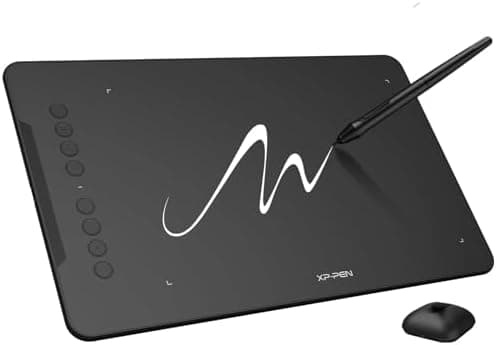
- The upgraded stylus features 16,384 levels of pressure sensitivity and supports up to 60 degrees of tilt, delivering smoother lines and shading for a natural drawing experience. With no battery or charging needed, it operates like a real pen, making it easy for beginners to create effortlessly. This functionality helps novice artists develop their skills and explore their creativity without the intimidation of complex tools
- Designed for Beginners
- This drawing pad desinged with 8 customizable shortcuts for both right and left-hand users, express keys create a highly ergonomic and convenient work platform
- Perfectly Adapted for Android
- The XPPen Deco 01 V3 art tablet supports connections with Android devices running version 10.0 and above. It is recommended to download the XPPen Tools Android application, which adapts to your smartphone's screen aspect ratio, ensuring accurate mapping. It also supports mapping on Android screens with different aspect ratios in portrait mode
- Large Drawing Space, Bigger Bold Inspiration
- This expansive drawing pad has10 x 6.25-inch helps you break through the limit between shortcut keys and drawing area
- Easy Connectivity for Beginners
- The Deco 01 V3 offers USB-C to USB-C connectivity, plus adapters for USB C. This ensures easy connection to various devices, allowing beginner artists to set up quickly and focus on their creativity without compatibility concerns. Whether using a laptop, tablet, or desktop, the Deco 01 V3 provides a seamless experience, making it an ideal choice for those just starting their digital art journey
- Lightweight and Portable
- The Deco 01 V3 tablet is just 8 mm thin, making it lightweight and easy to carry. Perfect for beginners, it fits easily in your backpack, allowing you to practice drawing or note-taking wherever inspiration strikes. Its compact size encourages frequent use, helping you build your skills on the go
- Digital Drawing Tablet
- Strong Compatibility-The Deco 01 V3 is compatible with Windows 7 (or later), Android 10.0 or later), mac OS 10.13 (or later), Chrome OS 88 (or later) and Linux. Also compatible with many major designer software such as Photoshop, $Al, Painter, llustrator and Clip Studio, etc.*Please update your Windows to version 11 or Mac OS to version 12 first
- Graphics Tablet
- High Tech IC-We’ve adopted the newest High Tech IC, to make lines flow smoother and perform better. The Deco lights up on the ends of the drawing area, so you can create, even in the dark
Yes these tablets will work with the majority if not all drawing apps, they are basically a mouse/pointer device that recognises pressure.
getting the Deco 01 V3 for drawing and taking notes. Even on a computer, this device was VERY difficult to use. ly.... no regrets! It is perfect ...
Trust tier reflects our editorial assessment of the source, not the individual quote. Hover for the rationale. See how we tier sources →
“XpPen Deco 01V3” · review on GNU/Linux
If the consensus convinced you
Check current price on Amazon
Pricing and availability change frequently. Tap through to confirm before buying.