

KVM Switch 2 Monitors 2 Computers Docking Station USB C + HDMI/DP Input with 100W PD, 4K60Hz/4K120Hz Displayport HDMI Dual…
Best for
Best USB-C
Amazon rating
Amazon aggregate, one input among many in the Verdict Score
Based on 1 trusted source
Current price
$127.99
Updated Jun 23, 2026 · 1 min read
Sources behind this verdict
10 reviewers weighted by source trust
The consensus
What reviewers found
Synthesized across the trust-weighted source mix below.
This unit combines a KVM switch with a 13-in-1 USB-C docking station, offering USB-C plus HDMI/DP input, 100W power delivery, and 4K60/4K120 dual-monitor output. The reviewers and communities we read are enthusiastic about this category for laptop-plus-desktop setups: r/UsbCHardware and r/homelab threads repeatedly recommend putting a dock on the laptop side of a KVM for true single-cable docking and better long-term wear resistance, with one r/UsbCHardware product-review thread praising combo units that bundle USB-C and DP/HDMI input, dual HDMI output, audio, card reader, and ethernet. The major caveat is data volume rather than sentiment.
What reviewers liked
- USB-C input with 100W power delivery charges and docks a laptop over one cable
- 13-in-1 dock adds ethernet, card reader, audio, and extra USB to a KVM
- r/UsbCHardware and r/homelab favor dock-plus-KVM designs for laptop/desktop combos
- Supports 4K60/4K120 dual-monitor output with HDMI/DP inputs too
Where it falls short
- 4.8-star average rests on only ~16 reviews, statistically too thin to be reliable
- Supporting community evidence covers the concept and rival units, not this exact model
- No high-trust independent lab measurement present in the signals
- Highest price among the desk-side picks (~$128)
Embed our score
Sell this product? Show off the rank.
Free badge for the brand, retailer, or anyone covering this product. Copy the snippet and paste it anywhere HTML works. Updates automatically when the ranking changes.
Includes a credit link back to this page. No tracking; no JavaScript.
This unit combines a KVM switch with a 13-in-1 USB-C docking station, offering USB-C plus HDMI/DP input, 100W power delivery, and 4K60/4K120 dual-monitor output. The reviewers and communities we read are enthusiastic about this category for laptop-plus-desktop setups: r/UsbCHardware and r/homelab threads repeatedly recommend putting a dock on the laptop side of a KVM for true single-cable docking and better long-term wear resistance, with one r/UsbCHardware product-review thread praising combo units that bundle USB-C and DP/HDMI input, dual HDMI output, audio, card reader, and ethernet.
The major caveat is data volume rather than sentiment. Its 4.8-star average rests on only about 16 verified-purchase reviews, which is far too thin to treat as a stable consensus, and we found no high-trust independent lab measurement for this specific model in the signals. The supporting community evidence speaks to the dock-plus-KVM concept and to competing products, not conclusively to this unit. For someone who docks a USB-C laptop alongside a desktop and wants charging plus peripherals over one cable, the approach is well-regarded; just treat the headline rating with caution until more reviews accumulate.
- USB C Dual Monitor Docking Station
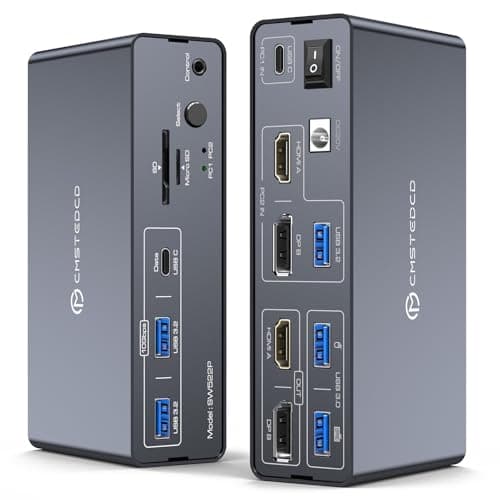
- The KVM Switch Docking Station allows USB C laptops and desktop computers to share a 13-in-1 multi-port docking station,you can share two monitors, a mouse, and a keyboard and switch seamlessly between your work laptops and personal computers, saving space and keeping your desktop neat and tidy, eliminating the need for repeated plugging and unplugging and improving work efficiency
- 100W PD Charging
- Support Charging,Keep devices juiced up with 100W PD pass-through charging (laptop).The included 120W adapter ensures stable power for all connected gear—no more cable clutter! NOTE: Macbook or Mac OS devices only support copy mode as system limitation
- USB C + HDMI/Displayport Input
- The KVM switch is equipped with USB-C and HDMI/DP input ports, effectively resolving connectivity issues caused by a lack of diverse ports, Note:requires your laptop to have a Thunderbolt 3/4/5 port
- HDMI+Displayport Output
- This KVM features two video output ports (HDMI + DisplayPort), allowing both computers to share the two monitors.HDMI port supports 4K60Hz, DisplayPort supports 4K120Hz and is backward compatible. Note:your computer, monitors, and cables must all support the corresponding resolutions
- Compact Design and Durable Use
- Compact and lightweight design allows easy placement on desks or tuck away underneath, meeting the needs of those who prefer a tidy workspace and want to keep cables organized to avoid clutter. The aluminum alloy casing enhances durability and heat dissipation, ensuring long-term, stable performance
- Plug and Play
- No drivers or software required.Simply connect all cables according to the instructions to enjoy a convenient working experience
- 13-in-1 Multi-port Docking Station
- Provides multiple shared peripheral ports,2x USB 3.0 for mouse and keyboard,2x 10Gbps USB 3.2, 1x USB-C date-ports allow you to connect more peripherals for faster transmission speed; 1x SD card slot and 1x Micro SD card slot give you a more convenient way to transfer data.Support you with a variety of data transfer methods to create a powerful home workstation. Note: The USB-C port labeled “Data” supports data transfer only and does not support PD charging or video transmission
- Two Switching Way
- Support external wire controller and panel button ,Using the wired extension button, place the KVM outside the work area, making your desktop cleaner and tidier.also can use the “Select” button on the front panel of the kvm to switch the signal source with one click. LED indicator will show which source is working,NOTE: Keyboard shortcuts (hotkeys) toggles are not supported
I am looking for a good dual-monitor KVM switch that could allow me to switch between them as easily as possible (ideally with the click of a single button if ...
Hello, I am looking for a KVM that has the ability to do shared and independent pc views across multiple monitors.
Trust tier reflects our editorial assessment of the source, not the individual quote. Hover for the rationale. See how we tier sources →
“This TESmart Dual Monitor KVM Switch CHANGED My Setup! (4K ...” · YouTube
If the consensus convinced you
Check current price on Amazon
Pricing and availability change frequently. Tap through to confirm before buying.