

UGREEN HDMI KVM Switch 1 Monitor 2 Computers, with 4 USB Ports 4K@60Hz KVM Switches for Sharing One Monitor Keyboard Mouse…
Best for
Best budget
Amazon rating
Amazon aggregate, one input among many in the Verdict Score
Based on 1 trusted source
Current price
$25.64
Updated Jun 23, 2026 · 1 min read
Sources behind this verdict
11 reviewers weighted by source trust
The consensus
What reviewers found
Synthesized across the trust-weighted source mix below.
At around $25, this single-monitor, two-computer UGREEN switch is the value pick in the pool, and its roughly 860 verified-purchase reviews give it the largest sample here. In r/desksetup, owners call UGREEN "a reliable solution" and "a fantastic option" for the price, and the 4K@60Hz single-display, four-USB layout covers the most common home-office scenario of toggling one monitor between a work and personal machine. The consensus is honest about the trade-offs that come with the price.
What reviewers liked
- Lowest price in the pool (~$25) with the largest verified-purchase sample (~860)
- r/desksetup owners call UGREEN reliable and a strong value
- 4K@60Hz single-monitor, four-USB layout fits common home-office switching
- Includes HDMI and USB cables plus a desktop controller
Where it falls short
- Retailer note documents a 5-7 second black screen after switching at 4K60
- Middling 4.0-star average reflects mixed real-world reliability
- r/desksetup user reported USB ports failing after a couple of months
- Broader r/buildapc threads cite mouse freezing on cheap HDMI KVMs
Embed our score
Sell this product? Show off the rank.
Free badge for the brand, retailer, or anyone covering this product. Copy the snippet and paste it anywhere HTML works. Updates automatically when the ranking changes.
Includes a credit link back to this page. No tracking; no JavaScript.
At around $25, this single-monitor, two-computer UGREEN switch is the value pick in the pool, and its roughly 860 verified-purchase reviews give it the largest sample here. In r/desksetup, owners call UGREEN "a reliable solution" and "a fantastic option" for the price, and the 4K@60Hz single-display, four-USB layout covers the most common home-office scenario of toggling one monitor between a work and personal machine.
The consensus is honest about the trade-offs that come with the price. A medium-tier retailer note documents a 5-7 second black screen after switching at 4K60 (3-5 seconds at 1080p), and r/desksetup users mention setup being "messy" and one case where USB ports stopped working after a couple of months. Broader r/buildapc discussion of cheap HDMI KVMs flags mouse freezing and problems driving LG TVs. The 4.0-star average reflects that mixed picture rather than a standout product. For simple, single-monitor office switching on a budget it earns its spot; demanding gaming or multi-monitor users should look higher up this list.
- KVM Switch 1 Monitor 2 Computers
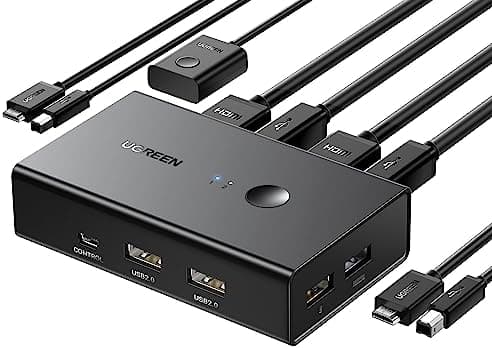
- This HDMI KVM Switch with 4 USB ports, and allows you to control 2 computers with only one set of USB devices such as a set of keyboard, mouse and printer on one monitor. You can easily switch between two computers, which keeps your workspace tidy. NOTE: MUST Connect both two USB A to B cables for the Power Supply and data transfer, so that the keyboard and mouse can be used normally
- Support Up to Ultra HD 4K@60Hz
- UGREEN KVM switches support resolution up to 4K@60Hz, also support 4K@30Hz, 2560*1440@120Hz or lower resolution. This HDMI KVM switch also supports HDMI 2.0, HDCP2.2/1.4, USB 2.0, 3D and HDR, which makes image display more exquisite and realistic, color is more bright and moving, really giving a feast for your eyes. NOTE: Please ensure that the resolution of the two devices at the input and the device at the output is consistent
- Two Switching Modes
- By One-Botton switch or desktop controller, freely switch between 2 computers, saving space on your desk and sharing your display, keyboard and mouse between both computers, increasing your productivity in the office or at home. When the KVM switch is not placed on the desktop, the desktop controller will be a good helper for you to switch quickly. (NOTE: It does Not support EDID Emulation and Hotkey Switching)
- Widely Used & Driver-Free
- With wide compatibility, this KVM switch HDMI 2 port box supports Windows 11/10/8.1/8/7/Vista/XP, Mac OS, and Linux systems. Just plug and play and without any installation. This HDMI USB KVM switch is also compatible with most HDMI source devices, such as Nintendo Switch/Switch 2, PS5/4/3, Xbox One, TV Box, PC, Laptop, etc. It is widely applied for Enterprise, Office, Multimedia Teaching, Meeting Rooms, Gaming Rooms, Research Tests, etc
- Package List
- 1* KVM Switch, 2* USB A to B Cables, 2* HDMI Cables, 1* Desktop Controller, 1* User Guide
- Note
- 1. Not supported for use with docking station. 2. If connect the wireless keyboard and mouse, please ensure their operating range meets the product's requirements (within 1m/3.3ft for a single USB device and within 0.3m/0.98ft for multiple USB devices). 3. To achieve 4K@60Hz resolution, the length of the HDMI cable must not exceed 5M/16FT. 4. Do not press the button on the switch or the desktop controller while connecting devices and cables. 5.It is not a DP KVM switch and it only supports only ONE monitor
It depends on the monitor. Generally, if the monitor is 4K@60Hz, the screen will be black for about 5-7s after switching, and when it is 1080P@60Hz, the screen will be black for about 3-5s after switching.
Setup is easy enough but kind of messy. I did run into an issue after a couple months of use where none of the USB ports worked but the DP ports ...
So I have recently been on the lookout for KVM switch to allow me to WFH without hassle and support high-refresh-rate OLED with all the nice ...
Trust tier reflects our editorial assessment of the source, not the individual quote. Hover for the rationale. See how we tier sources →
“UGreen HDMI KVM Switch Review and Testing” · 4K
If the consensus convinced you
Check current price on Amazon
Pricing and availability change frequently. Tap through to confirm before buying.