

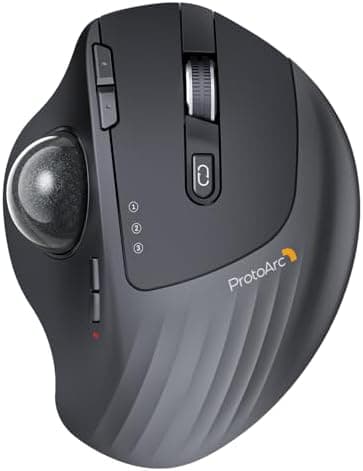
ProtoArc Wireless Trackball Mouse, EM01 NL Ergonomic Bluetooth Rollerball Thumb Rechargeable Computer Laptop Mouse, Adjustable…
ProtoArc · 3 more picks →
Best for
Best budget
Amazon rating
Amazon aggregate, one input among many in the Verdict Score
Current price
$31.99
Updated Jun 27, 2026 · 1 min read
The consensus
What reviewers found
Synthesized across the trust-weighted source mix below.
The ProtoArc EM01 NL is a budget thumb trackball that reviewers gravitate to for its adjustable angle and three-device Bluetooth-plus-dongle switching at roughly a third of the MX Ergo S price. Its 4.3 Amazon average across more than 3,300 ratings is a meaningful volume of verified-purchase feedback for an inexpensive entry. No expert reviews or specialist-community threads were attached to this listing in our data, so treat the rating as a real-world satisfaction signal rather than a validated precision benchmark, and remember Amazon averages are gameable and should be cross-checked.
What reviewers liked
- Adjustable angle and 3-device connectivity at a budget price
- Large retailer review pool (~3,300) for an inexpensive model
- Rechargeable with both Bluetooth and USB receiver options
Where it falls short
- 4.3 average trails the Logitech M575 line
- No expert or specialist-community signals attached to this listing
- Lesser-known brand with less documented long-term durability
Best Ergonomic Mice (Vertical & Trackball)
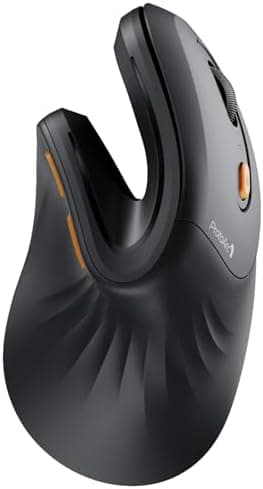
ProtoArc Ergonomic Mouse, EM11 NL Bluetooth Rechargeable Wireless…
Score 83
Best Wireless Mice (Productivity)
ProtoArc Ergonomic Mouse, EM11 NL Bluetooth Rechargeable Wireless…
Score 81
Best Ergonomic Split Keyboards
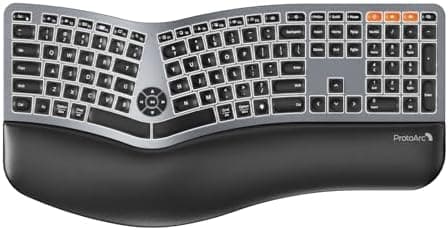
Backlit Bluetooth Ergonomic Keyboard, ProtoArc EK01 Plus Full Size…
Score 73
Embed our score
Sell this product? Show off the rank.
Free badge for the brand, retailer, or anyone covering this product. Copy the snippet and paste it anywhere HTML works. Updates automatically when the ranking changes.

Includes a credit link back to this page. No tracking; no JavaScript.
The ProtoArc EM01 NL is a budget thumb trackball that reviewers gravitate to for its adjustable angle and three-device Bluetooth-plus-dongle switching at roughly a third of the MX Ergo S price. Its 4.3 Amazon average across more than 3,300 ratings is a meaningful volume of verified-purchase feedback for an inexpensive entry. No expert reviews or specialist-community threads were attached to this listing in our data, so treat the rating as a real-world satisfaction signal rather than a validated precision benchmark, and remember Amazon averages are gameable and should be cross-checked.
- ERGONOMIC DESIGN for MORE COMFORT
- Unique adjustable hinge allows you to customize the trackball angle from 0 to 20 degrees according to your needs, ensuring a more natural, comfortable hand position for all-day comfort
- Precise Thumb Mouse
- ProtoArc trackball mouse provides accurate and smooth tracking, allowing for easy navigation through documents and web pages. You no longer need to move your arm for the movement of the cursor. Your thumb will control the cursor instead via the trackball. It will effectively reduce fatigue and strain on your wrist and arm. More productive in the narrow space, such as the messy desktop, couch, bed etc. Note: this trackball mouse is not an ordinary traditional mouse.
- Bluetooth & 2.4 G Wireless Connection
- PLUG and PLAY. This trackball mouse has triple connection modes. You can control three devices at the same time, switch freely between PC, laptop and iPad with just one button to improve your efficiency. Compatible with Windows, Android, Mac OS PC Laptop Desktop etc
- Rechargeable & Adjustable DPI
- The bluetooth Trackball Mouse built-in rechargeable lithium battery. No need to change batteries. Please remember to turn it off if you do not use it for a long time. 5 DPI levels (200/400/800/1200/1600) allows you to change the cursor sensitivity easily and track more smoothly
- Quiet Clicking
- Smooth frosted surface and quiet clicks can bring a better user experience and free your worry about bothering others and keep you stay focused while working. Note: The middle scroll wheel is not silent. All the buttons are non-programmable and the back forward buttons are not compatible with Mac OS system
- After using the trackball for a period of time, please clean the trackball and the three white rollers inside the hole to ensure that the trackball is always smooth. Note: When the computer is just started or a large application is running, it may also cause the trackball to not run smoothly
- Warm Tips
- Since it takes a learning curve to get used to the control method when using our trackball mouse for the first time, it may cause inconvenience to your mouse grip, you can experiment with different hand positions to find what is most comfortable for you. We recommend that you take 1-2 weeks to get used to it, as many users find that it will help reduce the pressure and pain on your wrist caused by long-term use of the mouse and improve comfort
If the consensus convinced you
Check current price on Amazon
Pricing and availability change frequently. Tap through to confirm before buying.