

Anker Prime Docking Station (DL7400), 14-Port Triple Display with DisplayLink, 140W Max, Smart Display, Triple 4K 60Hz, Cooling…
Best for
Best for dual external displays
Amazon rating
Amazon aggregate — one input among many in the Verdict Score
Current price
$299.99
Updated May 14, 2026 · 1 min read
Synthesis sources
Methodology →The consensus
What reviewers found
Synthesized across the trust-weighted source mix below.
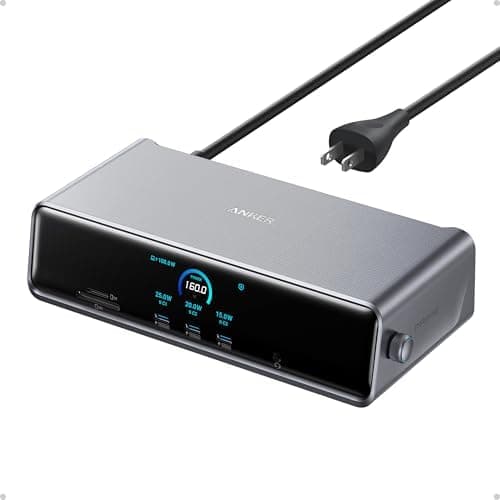
Across the reviewers we read, the Anker Prime DL7400 has carved out a specific niche: it's the dock that Mac users buy when they need to run three external monitors from a MacBook Air or base MacBook Pro that officially supports only one. r/mac and r/UsbCHardware threads repeatedly cite the built-in DisplayLink driver as the reason to choose it over cheaper alternatives, and How-To Geek's review called out the native 2.5Gb Ethernet and the front-facing smart display as standout features at the $300 tier. Macworld's verdict is more measured: their reviewer called it 'a solid choice if you want to connect three displays using dedicated video ports' but flagged the overall power budget as a weak point, noting that the dock spreads its wattage across many ports in a way that limits any single device.
What reviewers liked
- DisplayLink bypasses Apple's single-display limit on M-series MacBook Air and base Pro models
- Native 2.5GbE Ethernet is unusual at this price, per How-To Geek
- Front-panel smart display showing live wattage and fan mode is well-received by Reddit users
- 14 ports including 140W upstream USB-C cover almost any desk peripheral need
Where it falls short
- Macworld flagged the overall power distribution as underwhelming for a $300 dock
- DisplayLink is software-driven — not ideal for color-critical or motion-heavy work
- Requires the latest DisplayLink driver, adding a software dependency Mac users don't otherwise need
- Amazon rating sits at a modest 4.0/5 across 356 reviews, lower than cheaper Anker hubs
Across the reviewers we read, the Anker Prime DL7400 has carved out a specific niche: it's the dock that Mac users buy when they need to run three external monitors from a MacBook Air or base MacBook Pro that officially supports only one. r/mac and r/UsbCHardware threads repeatedly cite the built-in DisplayLink driver as the reason to choose it over cheaper alternatives, and How-To Geek's review called out the native 2.5Gb Ethernet and the front-facing smart display as standout features at the $300 tier.
Macworld's verdict is more measured: their reviewer called it 'a solid choice if you want to connect three displays using dedicated video ports' but flagged the overall power budget as a weak point, noting that the dock spreads its wattage across many ports in a way that limits any single device. r/laptops commenters counter that 140W to the host laptop is plenty for most ultrabooks and that the LCD power meter is genuinely useful for monitoring draw in real time.
The disagreement to flag honestly: DisplayLink is a software-based workaround, not true GPU video output, so reviewers caution that motion-heavy content (video editing, gaming) can show artifacts on the DisplayLink-driven monitors. For productivity multi-monitor setups it's the consensus pick; for color-critical creative work, reviewers steer buyers toward Thunderbolt-native solutions instead.
- Feature 1
- 14 Powerful Connections: Designed for modern setups, featuring a 140W 10Gbps USB-C upstream port, two 100W 10Gbps USB-C ports, one 100W 5Gbps USB-C port, two HDMI ports, one DisplayPort, two 5Gbps USB-A ports, one 480Mbps USB-A port, a 2.5Gbps Ethernet port, a headphone and mic combo jack, plus SD and TF card slots for complete desktop connectivity. It is recommended to plug the mouse/keyboard receiver into the 480Mbps USB A port.(Note: always use the included USB-C 3.2Gen 2 cable; other cables may cause issues.)
- Feature 2
- One 8K Output, Triple Display Versatility: Power up three external monitors at once, including one in 8K, for ultra-efficient multitasking. Compatible with both MacOS 13.5 or later and Windows 10/11.(Note: The latest DisplayLink driver installation is required.)
- Feature 3
- Each Port Powers and Performs: Every USB-C port supports both charging and data transfer. Power your laptop with up to 140W via the upstream port, while each front USB-C port delivers 100W of high-speed charging. (Note: The front USB-C ports do not support media display.)
- Feature 4
- Always Cool, Always in Control: View real-time updates on charging power, display performance, fan cooling mode, and settings directly from the smart display. The built-in fan and ActiveShield 3.0 help keep your device running cool and stable.
- Feature 5
- What You Get: Anker Prime Docking Station (14-in-1, Triple Display, DisplayLink), USB-C to USB-C 3.2 Gen 2 cable for upstream port (3.3 ft, 10 Gbps), 6ft AC power cord, safety sheet with user manual QR code , 24-month warranty, and our friendly customer service.
- Feature 6
- Note: Due to DisplayLink driver limitations, DRM-protected streaming (Netflix, Prime Video, Disney+, etc.) may show a black screen while audio still plays. Fix for browser streaming: disable hardware acceleration in browser settings.
But for anyone trying to fix the Mac monitor limit and clean up their desk space at the same time it is a super solid piece of hardware.
It easily pushes 140W to my laptops so they charge super fast. The little LCD screen is also pretty cool to watch the wattage change when I swap ...
Trust tier reflects our editorial assessment of the source — not the individual quote. Hover for the rationale. See how we tier sources →
If the consensus convinced you
Check current price on Amazon
Pricing and availability change frequently. Tap through to confirm before buying.