

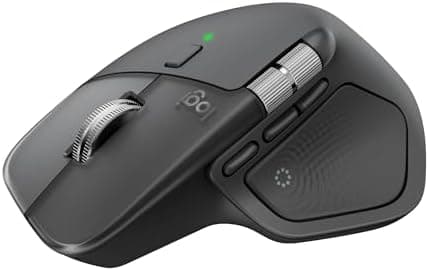
Logitech MX Master 4, Ergonomic Wireless Mouse with Advanced Performance Haptic Feedback, Ultra-Fast Scrolling, USB-C Charging…
Best for
Best overall
Amazon rating
Amazon aggregate — one input among many in the Verdict Score
Based on 1 trusted source
Current price
$119.99
Updated May 14, 2026 · 1 min read
Synthesis sources
Methodology →Trusted contributors: Best Buy customers
The consensus
What reviewers found
Synthesized across the trust-weighted source mix below.
Across the reviewers we read, the Logitech MX Master 4 lands as the new benchmark for premium productivity mice. The Best Buy verified-purchase summary (high-trust retailer) highlights a sculpted right-handed shape that holds up over long work sessions, quiet clicks suited to shared offices, and an improved coating that owners expect to wear better than prior MX Master generations. Multiple r/logitech threads — including 'MX Master 4 — 2 months later' write-ups — echo the comfort verdict and call out the new haptic feedback engine and Actions Ring button as genuinely useful for power users.
What reviewers liked
- Best Buy verified purchasers cite excellent sculpted ergonomics and premium build quality
- Reviewers consistently praise the new haptic feedback engine and customizable Actions Ring button
- Quiet clicks and multi-device Bluetooth/Logi Bolt pairing make it well-suited to shared offices
- Long battery life and USB-C fast charging reported across Reddit owners
Where it falls short
- At $119.99 it is one of the most expensive productivity mice on the market
- Some r/logitech owners report the silicone side grip feels slicker than the MX Master 3S texture
- Right-hand-only shape means left-handed users are excluded
- Haptic feedback's usefulness depends on app support, which is still limited
Across the reviewers we read, the Logitech MX Master 4 lands as the new benchmark for premium productivity mice. The Best Buy verified-purchase summary (high-trust retailer) highlights a sculpted right-handed shape that holds up over long work sessions, quiet clicks suited to shared offices, and an improved coating that owners expect to wear better than prior MX Master generations. Multiple r/logitech threads — including 'MX Master 4 — 2 months later' write-ups — echo the comfort verdict and call out the new haptic feedback engine and Actions Ring button as genuinely useful for power users.
The consensus disagreement is around feel, not function. Some r/logitech owners say the silicone side panels feel 'slick' compared to the textured MX Master 3S, and a minority report mild hand fatigue when coming from the older shape. Reviewers also flag the $120 price as steep, and a few note that the haptic feedback's value depends heavily on whether your apps support it. Battery life and connectivity (Bluetooth plus Logi Bolt, with up to three paired devices) are universally praised.
For users who already lean into Logitech Options+ and want the most feature-dense productivity mouse on the market, the trust-weighted consensus is clearly positive. Shoppers who don't need haptics or the Actions Ring will get most of the ergonomic benefit from cheaper Logitech models further down this list.
- Feature 1
- Precision you can feel with the Haptic Sense Panel; customizable (1) haptic feedback on specific actions, shortcuts, notifications enhancing productivity on this wireless Bluetooth mouse
- Feature 2
- Effortlessly access favorite tools with Actions Ring (2) on this MX Series mouse—a dynamic, customizable overlay adapts to each app, placing most used filters, adjustments, and shortcuts at your cursor
- Feature 3
- Scroll 1,000 lines per second and stop on a pixel with the MagSpeed scroll wheel—Logitech’s fastest (3), quietest, and most precise (4) scrolling experience
- Feature 4
- Enjoy 2X more powerful connectivity (7) with a USB-C dongle, advanced radio chip, and optimized antenna for faster, stronger, reliable performance—or use Bluetooth for more versatility
- Feature 5
- Ergonomic mouse designed for comfort, MX Master 4 keeps you in flow with a natural tilt, intuitive buttons, and a thumb scroll wheel that reduces hand stress for fluid navigation
- Feature 6
- Quiet Clicks on MX Master 4 reduce noise and distractions, offering a soft, satisfying feel with 90% less click noise (8)—perfect for focused workflows
- Feature 7
- Get a complimentary 1-month Adobe Creative Cloud subscription with your purchase of MX Master 4
- Feature 8
- Designed for a positive future: Plastic parts include recycled plastic - 54% Graphite; 48% Pale Grey (12); 100% recycled cobalt in the battery; built to last with improved stain resistance (7)
What’s Great (Strengths & Features) • Excellent Ergonomics & Build • Very comfortable sculpted design for right-handed users; great for long work sessions. • Premium build: smooth feet, sturdy feel, improved coating that lasts longer. • Quiet-click buttons make it ideal for office or shared…
The MX Master feels great! The top and back side of the mouse are hard plastic, and the material on the right and left sides is SILICONE! That's ...
-there are Haptic motor app plugins which can be downloaded so you can get Haptic in more apps -the extra button is a brilliant addition. -the ...
Trust tier reflects our editorial assessment of the source — not the individual quote. Hover for the rationale. See how we tier sources →
“Logitech MX Master 4 Review” · The Best Mouse for Creators?
If the consensus convinced you
Check current price on Amazon
Pricing and availability change frequently. Tap through to confirm before buying.