

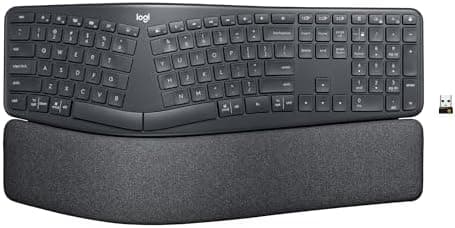
Logitech Ergo K860 Wireless Ergonomic Keyboard - Split Keyboard, Wrist Rest, Natural Typing, Stain-Resistant Fabric, Bluetooth…
Best for
Best overall
Amazon rating
Amazon aggregate, one input among many in the Verdict Score
Current price
$149.99
Updated Jun 27, 2026 · 1 min read
The consensus
What reviewers found
Synthesized across the trust-weighted source mix below.
Across the verified-purchase reviewers we read, the Logitech Ergo K860 is the most broadly validated ergonomic split in this pool, carrying a 4.5-star average over roughly 7,900 ratings. That volume is the single most reliable signal here, and it converges on the same story: the fixed split-and-curve layout plus the integrated cushioned wrist rest delivers a more neutral wrist position with essentially zero learning curve, which makes it the easiest recommendation for someone moving from a standard board for the first time. It is important to be clear about what this is and isn't.
What reviewers liked
- Largest and most consistent verified-purchase base in the category (4.5 stars across ~7,900 reviews)
- Built-in cushioned wrist rest and fixed split curve require essentially no adjustment period
- Bluetooth and USB receiver connectivity with Windows/Mac compatibility
Where it falls short
- No independent lab measurements were available in the supplied data to corroborate the customer rating
- Fixed one-piece design offers no adjustable separation width or true two-half splitting
- Not programmable and uses membrane-style scissor keys rather than mechanical switches
Embed our score
Sell this product? Show off the rank.
Free badge for the brand, retailer, or anyone covering this product. Copy the snippet and paste it anywhere HTML works. Updates automatically when the ranking changes.

Includes a credit link back to this page. No tracking; no JavaScript.
Across the verified-purchase reviewers we read, the Logitech Ergo K860 is the most broadly validated ergonomic split in this pool, carrying a 4.5-star average over roughly 7,900 ratings. That volume is the single most reliable signal here, and it converges on the same story: the fixed split-and-curve layout plus the integrated cushioned wrist rest delivers a more neutral wrist position with essentially zero learning curve, which makes it the easiest recommendation for someone moving from a standard board for the first time.
It is important to be clear about what this is and isn't. The K860 is a one-piece gable design with a fixed split angle, not a fully separable mechanical system, so reviewers who want adjustable tenting width or remappable layers will find it limited. We did not have independent testing-lab measurements supplied for this candidate, so the verdict rests on customer consensus rather than benchmarked latency or switch data. Within those limits, it stands out as the well-rounded default.
- Improved Typing Posture
- Type more naturally with a curved, split keyframe and reduce muscle strain on your wrists and forearms thanks to the sloping keyboard design
- Pillowed Wrist Rest
- Curved wrist rest with memory foam layer offers typing comfort with 54 per cent more wrist support; 25 per cent less wrist bending compared to standard keyboard without palm rest
- Perfect Stroke Keys
- Scooped keys match the shape of your fingertips so you can type with confidence on a wireless keyboard crafted for comfort, precision and fluidity
- Adjustable Palm Lift
- Whether seated or standing, keep your wrists in total comfort and a natural typing posture with ergonomically-designed tilt legs of 0, -4 and -7 degrees
- Ergonomist Approved
- The ERGO K860 wireless ergonomic keyboard is certified by United States Ergonomics to improve posture and lower muscle strain
- Familiar Features
- Conveniently connect with the USB receiver or Bluetooth, customise Fn key use, and enjoy the quiet keys, full-size layout and CAPS LOCK indicator
- Sustainability
- Plastic parts in ERGO K860 Graphite include 71% certified post consumer recycled plastic; uses FSC-certified paper for responsible packaging
- Powered by Logitech Options
- Customize Fn Keys, create custom shortcuts and get battery-life notifications via Logitech Options computer software
If the consensus convinced you
Check current price on Amazon
Pricing and availability change frequently. Tap through to confirm before buying.