

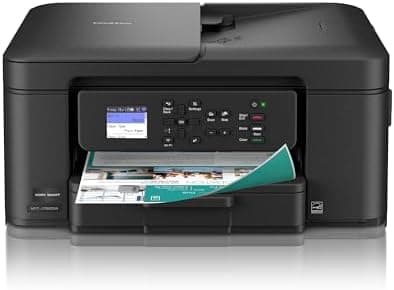
Brother Work Smart 1360 Wireless Color Inkjet All-in-One Printer with Automatic Duplex Printing and 1.8” Color Display | Includes…
Best for
Best Brother MFC
Amazon rating
Amazon aggregate, one input among many in the Verdict Score
Based on 3 trusted sources
Current price
$89.99
Updated May 18, 2026 · 1 min read
Sources behind this verdict
12 reviewers weighted by source trust
The consensus
What reviewers found
Synthesized across the trust-weighted source mix below.
Across the reviewers we read, the Brother MFC-J1360DW is positioned as the value play in Brother's color inkjet lineup, and the trust signals largely support that framing. RTINGS calls out excellent print quality and a 'very complete feature set,' including an automatic document feeder and automatic duplex printing — uncommon in this sub-$100 tier. Best Buy's verified-purchase aggregate sits at 86% positive, with customers citing overall performance, print quality, and easy Wi-Fi connectivity, though several flag setup as tedious.
What reviewers liked
- RTINGS rated print quality 'excellent' with complete feature set including ADF and duplex
- Best Buy verified-purchase aggregate around 86% positive on performance and connectivity
- Long-term Brother inkjet reliability reported across r/printers threads
- Aggressive sub-$100 price for an all-in-one with auto duplex
Where it falls short
- Best Buy reviewers report setup process can be tedious
- Cartridge ink yields higher cost per page than tank-based alternatives
- Small 1.8-inch display and limited ADF capacity versus office-class units
- Infrequent users will see maintenance cycles consume ink, a common inkjet complaint on r/printers
Embed our score
Sell this product? Show off the rank.
Free badge for the brand, retailer, or anyone covering this product. Copy the snippet and paste it anywhere HTML works. Updates automatically when the ranking changes.

Includes a credit link back to this page. No tracking; no JavaScript.
Across the reviewers we read, the Brother MFC-J1360DW is positioned as the value play in Brother's color inkjet lineup, and the trust signals largely support that framing. RTINGS calls out excellent print quality and a 'very complete feature set,' including an automatic document feeder and automatic duplex printing — uncommon in this sub-$100 tier. Best Buy's verified-purchase aggregate sits at 86% positive, with customers citing overall performance, print quality, and easy Wi-Fi connectivity, though several flag setup as tedious.
On r/printers, the recurring sentiment is cautious approval: long-time Brother inkjet owners report 8-plus years of service on prior models, and threads specifically asking 'is this a good printer' tend to land positive, though one user warns to ignore shill-style reviews and look for genuine ownership reports. The 1.8-inch color display is modest, and at this price point the unit is positioned squarely as a home or light home-office printer, not a workgroup machine.
The honest cons cluster around build feel and feature ceilings. This is cartridge ink, so running cost will be higher per page than the MAXIFY GX2020 tank system. The ADF capacity is small. And as with all inkjets, infrequent users should expect occasional maintenance cycles that consume ink.
- Best For Home And Home Office
- Get all your work done with an all-in-one multifunction printer. Print, copy, and scan on one compact printer for home use and home offices. Brother inkjet printers produce beautiful prints for results that stand out.
- Easy To Use With Cloud App Connections
- Print from and scan to popular Cloud apps(2), including Google Drive, Dropbox, Box, OneDrive, and more from the simple-to-use 1.8” color display on your printer.
- Productivity-Focused Printing Features
- This printer includes automatic duplex (2-sided) printing, a 20-sheet single-sided Automatic Document Feeder (ADF)(3), and a 150-sheet paper tray(3). Engineered to print at fast speeds of up to 16 pages per minute (ppm) in black and up to 9 ppm in color(4).
- Multiple Connection Options
- Connect your way. Interface with your printer on your wireless network or via USB.
- The Brother Mobile Connect App
- Go mobile with the Brother Mobile Connect app(5) that delivers easy onscreen menu navigation for printing, copying, scanning, and device management from your mobile device. Monitor your ink usage with Page Gauge to help ensure you don’t run out(6) .
Customers recognize the Work Smart 1360 Wireless All-in-One printer for its overall performance and good print quality. Many appreciate its size and easy connectivity to Wi-Fi. However, some customers have found the setup process to be tedious.
We don’t recognize that sign in. Your username maybe be your email address. Passwords are 6-20 characters with at least one number and letter.
Your thoughts? I see many recommend Brother printers. Had an HP a few years ago that was horrible could never get it to work right.
I have been looking at reviews, but a lot of it seems more like self-stroking or stroking-for-pay reviews. I'm looking for actual reviews.
Trust tier reflects our editorial assessment of the source, not the individual quote. Hover for the rationale. See how we tier sources →
“Don't Buy the Brother Work Smart 1360 Review Until You Watch This!” · YouTube
If the consensus convinced you
Check current price on Amazon
Pricing and availability change frequently. Tap through to confirm before buying.